


Booking.com – Transferring Discounts via the Promotions Feature
The new Promotions feature allows you to transfer discounts configured in Previo directly to the Promotions section in the Booking.com Extranet.
Unlike the previous method, where discounts were automatically applied to the rates sent from Previo, discounts are now transferred as separate promotions.
The main advantage is that discounts are clearly highlighted to guests on Booking.com. Guests can see the original price crossed out alongside the discounted price, making the offer more attractive and potentially encouraging more bookings.
1. How Does the Feature Work?
Discounts are still configured directly in Previo under Pricelist → Discounts and Surcharges.

Once a supported discount is created or modified, it is automatically and immediately transferred to the Booking.com Extranet, where it appears under Promotions → Your Active Promotions.
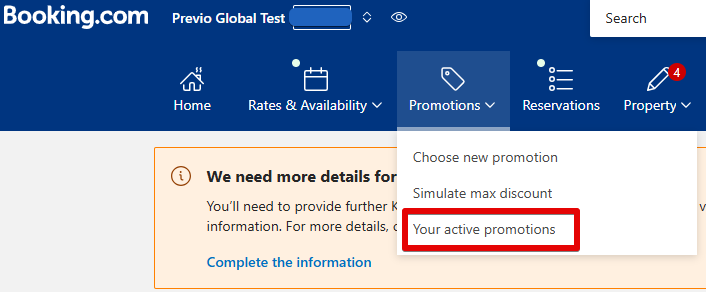
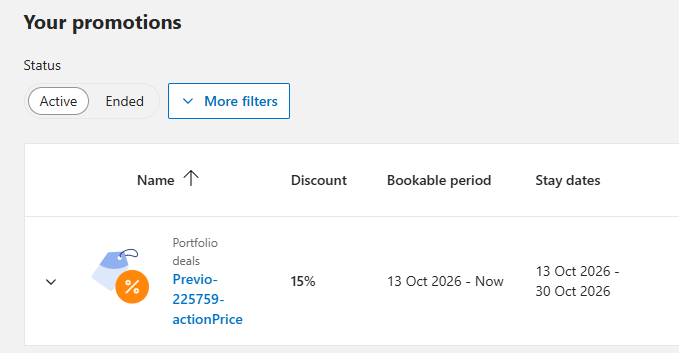
Please note: The discount validity period may be displayed differently in Previo and Booking.com. For example, if a discount is configured in Previo until October 31, Booking.com may display the end date as October 30. However, in both cases, the discount still applies to the final night of October 30–31. This is simply a difference in how dates are displayed and does not indicate a synchronization error.
The following promotion types are supported:
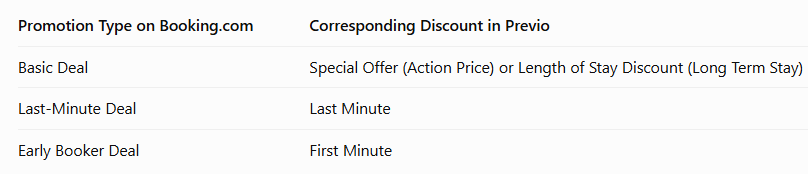
Each discount can be restricted to specific dates, room types, and rate plans.
2. Feature Limitations
The Promotions feature supports the transfer of percentage-based discounts only. Other types of price adjustments are not supported.
Supported Price Adjustments:
- Percentage-based discounts (%).
Unsupported Price Adjustments:
- Fixed-amount discounts and surcharges.
- Percentage-based surcharges (%).
Important: Activating the Promotions feature completely replaces the previous method of transferring discounts and surcharges to Booking.com.
This means that unsupported price adjustments are completely ignored when rates are transferred to Booking.com. These discounts and surcharges are neither transferred to the Promotions section nor applied to the rates sent from Previo, as they were under the previous method.
For example, if you use a fixed-amount surcharge or discount in Previo, these adjustments will no longer be reflected in the rates displayed on Booking.com once the Promotions feature is activated.
Additional Limitations:
Combining Discounts: Booking.com does not allow promotions transferred from Previo to be combined (e.g., a Special Offer and a Last-Minute Deal). If multiple promotions apply to the same reservation, only the single most advantageous discount for the guest will be applied.
From Booking.com:
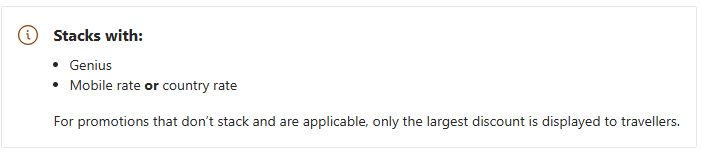
* In contrast, the R+ booking engine supports combining multiple discounts. Therefore, when several promotional offers apply simultaneously, differences may occur between the final price displayed on Booking.com and the price offered through the R+ booking engine.
Booking.com Special Offers: The Promotions feature does not support transferring or managing Genius discounts, mobile rates, or other special offers from Booking.com’s own portfolio. These offers must continue to be managed directly in the Booking.com Extranet.
Before activating the Promotions feature, we recommend reviewing your existing discounts and surcharges in Previo to ensure that the new method of transferring discounts meets your needs.
How to Set a Higher Rate for a One-Night Stay?
A surcharge for short stays, most commonly for one-night stays, is typically managed through separate rate plans with minimum length of stay restrictions. You can find detailed instructions here.
However, if you want to take full advantage of the Promotions feature, which does not support surcharges, we recommend using an alternative pricing approach (reverse pricing logic). This method has also proven effective for Airbnb connections, where transferring multiple rate plans is not supported.
How Does Reverse Pricing Logic Work?
Instead of adding a surcharge for a one-night stay, you set higher base rates in Previo that already reflect the desired price for a single-night stay.
Then, under Pricelist → Discounts and Surcharges → Long Term Stay, you create a percentage-based discount that applies to stays of 2 nights or more.
Example:
- One-night stay: Base rate of CZK 2,000 per night.
- Stays of 2 nights or more: 10% discount on the base rate.
- Final rate for stays of 2 nights or more: CZK 1,800 per night.
This approach allows you to offer more attractive rates for longer stays without relying on unsupported surcharges.
Benefits of Setting Up Long-Stay Discounts via Promotions Compared to the Previous Rate Plan-Based Approach
- More attractive discount presentation on Booking.com – Long-stay discounts are automatically transferred to the Promotions section on Booking.com, where they can be displayed to guests as special offers with the original price crossed out, rather than simply as lower prices under separate rate plans.
- Easier setup and management – There is no need to create separate rate plans for different lengths of stay in Previo or corresponding rate plans on Booking.com.
- No need to configure length-of-stay restrictions (MLOS) – The discount is automatically applied when the specified minimum length of stay is met, without the need to create and manage separate restrictions.
- No need to regularly extend restrictions – Unlike the previous rate plan-based approach, there is no need to continuously monitor and extend the validity of length-of-stay restrictions configured in Previo’s price lists.
With the Promotions feature, you benefit not only from simpler and more efficient management of long-stay discounts but also from the opportunity to present your special offers more attractively on Booking.com.
3. Synchronization and Management of Promotions
Each discount transferred from Previo to Booking.com is assigned a unique numerical identifier corresponding to the discount ID in Previo.
This numerical identifier is not visible to guests and is used for internal identification purposes only.
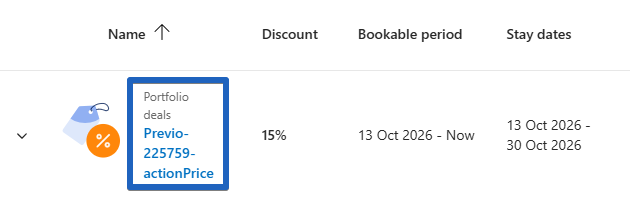
This identifier maintains the connection between the two systems and enables automatic updates to the promotion whenever the corresponding discount settings are modified in Previo.
Important: Do not modify the numerical identifier of a promotion in the Booking.com Extranet.
If this identifier is changed directly in Booking.com, the link to the original discount in Previo will be lost. As a result, any subsequent changes to the discount in Previo will not update the existing promotion. Instead, a new promotion will be created on Booking.com.
We therefore recommend managing and modifying all synchronized discounts exclusively in Previo.
If a promotion is accidentally modified or renamed directly in the Booking.com Extranet, please contact us at chm@previo.cz to request a resynchronization of discounts between Previo and Booking.com.
4. Differences Between the Previous and New Methods of Transferring Discounts
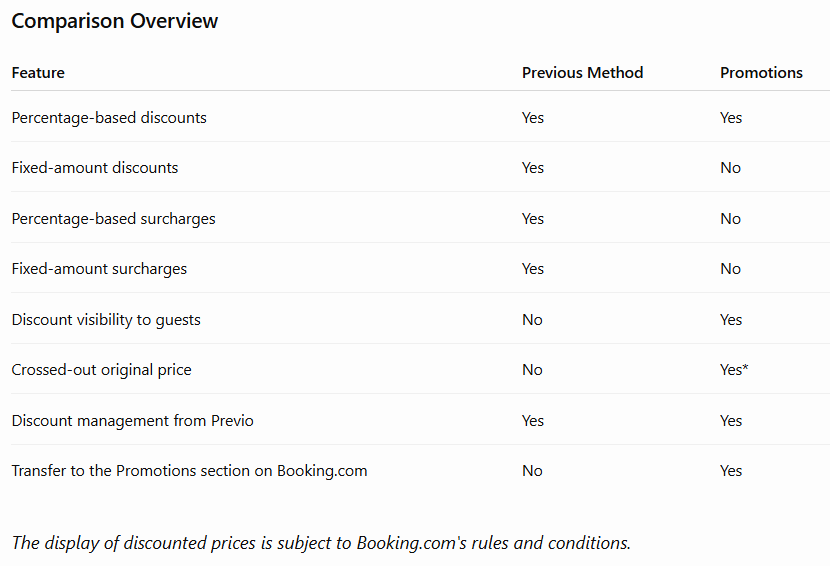
*Previous Method – Discounts Applied Directly to Rates
With the previous method, discounts or surcharges are automatically applied to the rates before they are sent to Booking.com.
As a result, Booking.com receives the final adjusted rate (discounted or increased) without any information about the discount or surcharge that has been applied.
Advantages:
- Supports both percentage-based and fixed-amount discounts.
- Supports both percentage-based and fixed-amount surcharges.
Disadvantages:
- Guests on Booking.com cannot see the original price or any information about the discount applied.
- There is no visual indication of the discount, such as a crossed-out original price.
*New Method – Promotions
When using the Promotions feature, the original rate is sent to Booking.com without any discount applied. The discount itself is transferred separately to the Promotions section.
Booking.com then displays the discounted price to guests directly on its website when they search for accommodation.
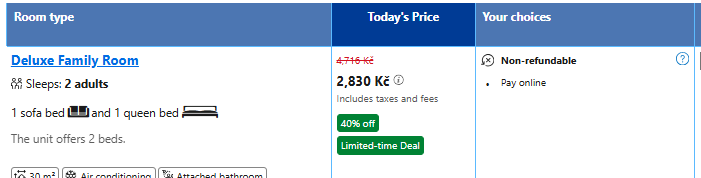
Advantages:
- Discounts are clearly highlighted to guests.
- The original crossed-out price can be displayed alongside the discounted price.
- Supported promotions can be managed automatically and directly from Previo.
Disadvantages:
- Only percentage-based discounts are supported.
- Fixed-amount discounts and all types of surcharges are not supported.
5. Feature Activation
The Promotions feature is currently available upon request. If you would like to activate this feature, please contact us at chm@previo.cz.
Important Notice Before Activation:
Activating the Promotions feature will synchronize supported promotions on Booking.com according to the discount settings in Previo.
This means that existing promotions configured directly in the Booking.com Extranet that fall within the scope of this synchronization will be removed and replaced with promotions transferred from Previo.
Promotions and discounts that are not managed by the Promotions feature (such as Genius discounts or mobile rates) will remain unchanged.
Before activation, we therefore recommend reviewing your discount settings in Previo to ensure they reflect the pricing conditions and promotions you wish to offer on Booking.com.