


Service mapping
The Service Mapping module allows you to map services available on partner booking portals to services defined in the Previo system.
Thanks to this mapping, services included in reservations received from partner portals are recorded in the reservation account in accordance with the property’s individual settings in Previo.
* Where can you find the module?
The module is available in the Previo interface under: Settings → Online Reservations → Service Mapping
* Supported portals:
The service mapping functionality is currently available for reservations received from the following booking portals and partner systems:
-
Booking.com
-
Airbnb
-
D-EDGE
-
Profitroom
Retrieving services from partner portals:
Services configured on supported partner portals are automatically retrieved and displayed in the Service Mapping module once the Channel Manager team has completed the room mapping.
There is therefore no need to manually add individual services from partner portals to this module.
How to map services:
-
Make sure that the required service has been created in Previo under Price list → Services.
-
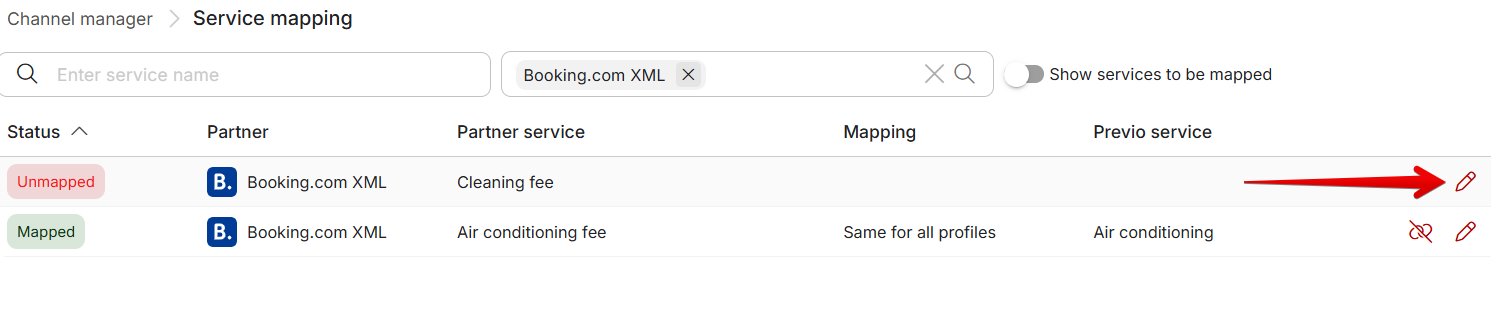
Navigate to Settings → Online Reservations → Service Mapping.
-
Locate the service retrieved from the relevant partner portal.
-
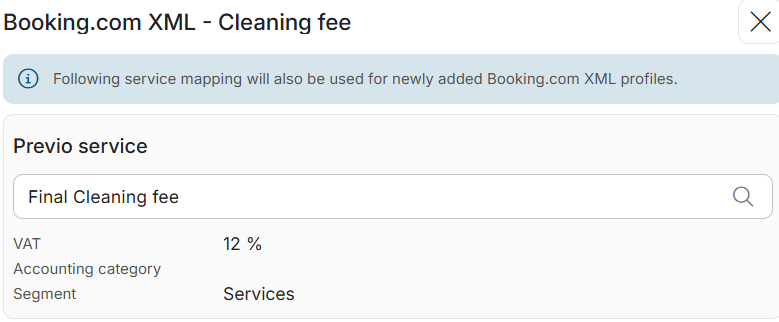
Map it to the corresponding service defined in Previo by clicking the pencil icon at the end of the respective service row.
If you wish to remove the service mapping, click the corresponding icon, as shown in the image below:

City tax
City tax is an exception to the procedure described above. This item is predefined in the Previo system and therefore cannot be individually mapped or modified within the Service Mapping module.
What are the benefits of service mapping?
If a service from a partner portal is mapped to the corresponding service in Previo, it will be recorded in the room account according to your individual settings in Previo whenever a reservation containing this service is received. The parameters of the mapped service, such as the service name, segment, VAT rate and account assignment, will be applied automatically.
Service mapping therefore allows you to standardize the recording of services across different partner portals while ensuring their correct accounting classification in accordance with the property’s individual settings.