Availability issues
In this case, your channel manager is connected correctly, and we have confirmed that the availability data is being sent to Booking.com accurately.
However, Booking.com has some features that can impact availability.
For this reason, your accommodation may be closed even if you still have rooms available.
Alternatively, you may be offered capacities that are no longer available, which may lead to overbooking.
Autoclosed: Availability
This refers to a situation where your calendar (section Rates & Availability – Calendar) is open and marked as “Bookable”, but your Booking.com profile shows the status “Not bookable”.
Cause: According to Booking.com, this closure may occur when prices and availability are not set at least 365 days in advance. In practice, we also commonly encounter this situation when no dates are available for more than 24 hours.
Solution: After updating prices in Previo / opening availability, it is necessary to wait approximately 24 hours. The Booking.com profile should then be automatically reactivated and made bookable again.
IMPORTANT! If your property is still not available after this period, please contact Booking.com customer support. Guide the agent to the calendar in the extranet so they can verify that prices and availability are correctly set, and request that your property be reactivated and published.
Restrictions limiting sales
Your property may also be unavailable due to a restriction set at the rate plan level on Booking.com, specifically in the “Rates and availability – Rate plans” section.
Although Booking.com states that restrictions sent via the channel manager take priority over those set in the linked rate plans, we have encountered several cases where this was not the case. As a result, these settings on Booking.com caused the property to be unavailable.
To resolve the issue, simply reconfigure the restrictions so that no value is set.
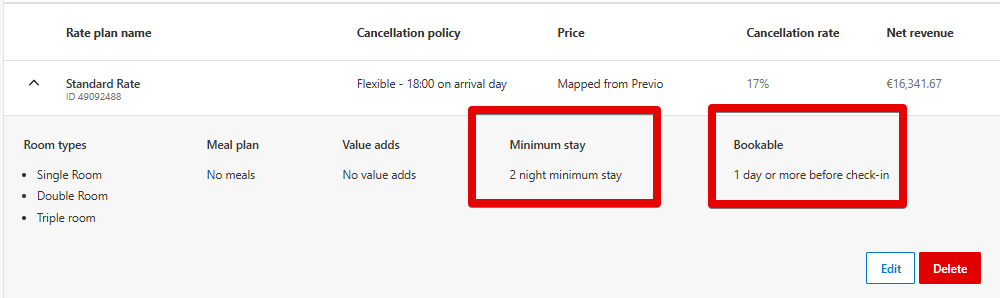
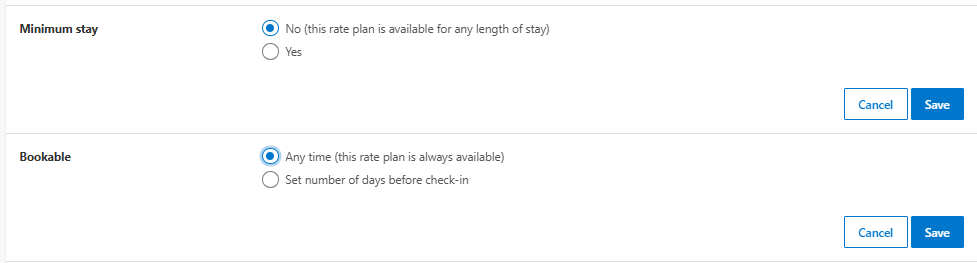
A hidden restriction can also be set in the calendar – this is a restriction that is not visible in the calendar because of the hidden rows for its entry.
It can also be a restriction that the Channel Manager does not work with (a restriction that is not part of the Previo pricelist) – for example, most often a restriction of min. stay from arrival.
In this case, you must contact Booking.com customer support and ask them to remove the restriction.
Auto-Replenishment
Auto-Replenishment is a feature on Booking.com that automatically puts vacant rooms back on sale after a booking is cancelled or changed.
Once a booking is cancelled, the room capacity is immediately offered to other guests without Booking.com waiting for availability data to be updated from the channel manager.
As Booking.com does not wait for the channel manager to synchronise, this feature can cause overbooking.
The feature consists of two parts, and only the second part can be deactivated.
- the first part of the feature ensures that availability is always automatically increased after a cancellation or modification of a booking. In simple terms, the first part works with the number of rooms available for sale.
- deactivating the second part means that if a room/term is closed (marked in red as a stop sale or 0 rooms for sale), it will not automatically be reopened or offered for sale, even if a reservation is canceled. Essentially, the second part controls the status of the room (open/closed for booking).
ATTENTION! In general, it is recommended to contact Booking.com and always have this feature (the second part) deactivated.
*This feature is often associated with manual interventions on Previo reservations, such as cancelling a reservation or changing a date, before the guest has made an official change on Booking.com. Therefore, we do not recommend making manual changes to reservations before the changes are automatically transferred by the channel manager and availability is reconfirmed by Booking.com.
Hard Close
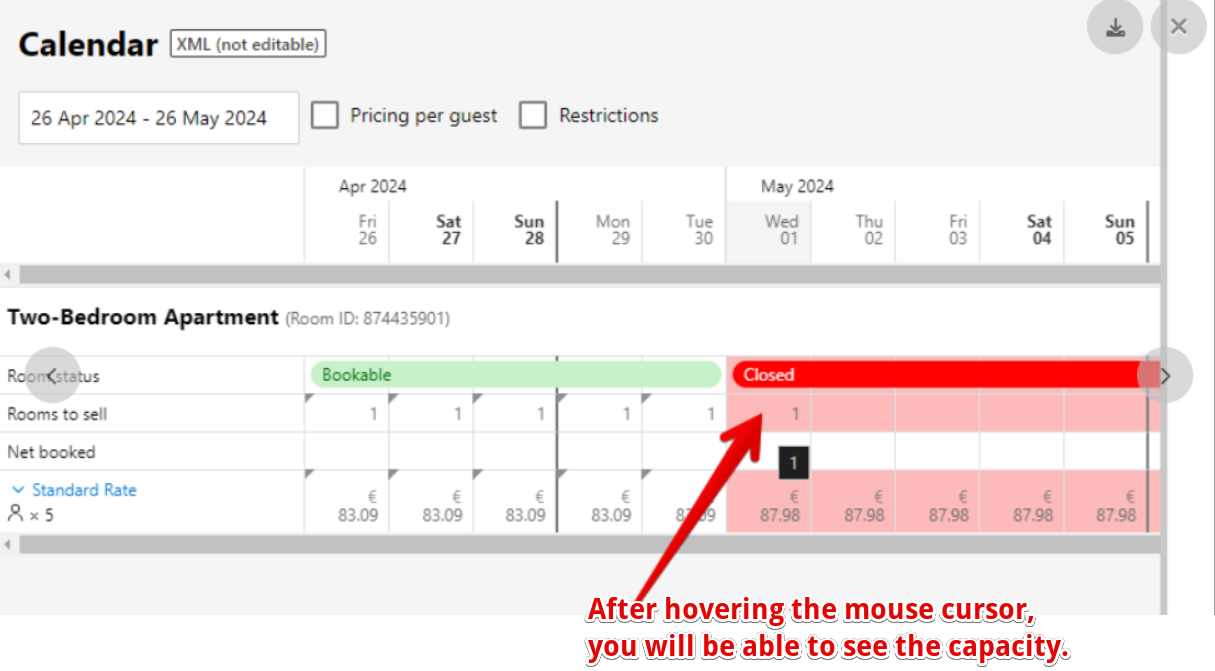
In this case, the room/term closure is applied from Booking.com’s side. This closure overrides the availability data from Previo channel manager and therefore it is not possible to unblock the dates/rooms from our side.
To check for a hard close, hover over the “Rooms to sale” line in the Booking.com extranet calendar (Rates&Availability – Calendar), and you will be able to see the number of rooms.
How to solve Hard Close?
As this is a Booking.com closure, Booking.com should resolve the situation directly.
However, in our experience, disconnecting and reconnecting the channel manager has proven to be the fastest and most effective solution.
When reconnecting, the calendar in the Booking.com extranet is reset and the current availability is reloaded from Previo.
If you suspect that this type of closure has occurred, please contact us at chm@previo.cz. We will review the situation and propose the next steps.
Snooze Property
The Snooze Property feature is a function that allows you to temporarily pause your Booking.com accommodation listing for as long as needed, and reactivate it when you’re ready to start receiving guests again.
More information about this feature can be found here.
WARNING! When you deactivate this feature, your profile will go back online, and the number of rooms available for sale will automatically increase. This feature is not fully compatible with the Channel Manager, so we recommend using the pricelist closure option in Previo to close your profile instead.
If you still choose to use this feature, please contact us immediately so we can update the availability dates in your calendar. Otherwise, you risk the possibility of overbooking.
Profile is not online
If you have created a new profile that is not already listed, Booking.com will first set it as offline.
Once we are connected, you will need to switch the profile to online mode to make your offer available. It may take approximately 30-40 minutes for your property’s listing to appear on Booking.com.
Additionally, the profile will automatically be switched to offline mode if the calendar in the extranet is changed to a different currency.
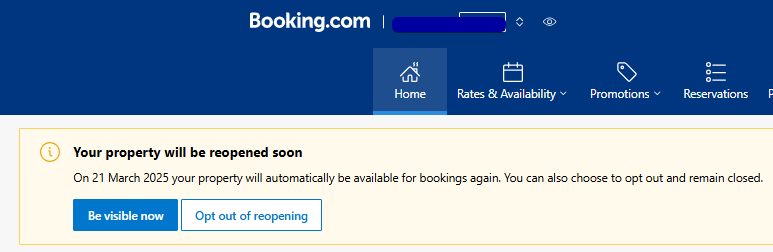
Solution: you can put your profile online directly from the Booking.com extranet Homepage by selecting “Enable online booking” or “Be visible now option”.